Welcome to the Cadillac V-Series Forums!

What "don't" you like about your BW"?

That the heated steering wheel and heated seats come on automatically. Is there a way to turn this off?

To disable the automatic heating of the seats and steering wheel in your 2025 Cadillac CT5-V Blackwing (which activates by default when the outside temperature is cold, typically around 48–54°F based on user reports, and the HVAC is set low), follow these steps via the infotainment system:


1. Tap the Climate or Settings icon on the 33-inch touchscreen (home screen).


2. Navigate to the Comfort or Climate submenu (it may be under Vehicle > Comfort & Convenience).


3. Look for Auto Heated Seats & Steering Wheel (or similar phrasing like “Auto Heated Features”).


4. Toggle the option to Off.


This prevents auto-activation on startup. You can still manually turn on heating as needed via the physical seat/steering controls or touchscreen. If the exact menu label varies slightly, refer to your owner’s manual under “Climate Control” for confirmation. The feature is factory-enabled for convenience in cold weather but can be re-enabled anytime the same way.
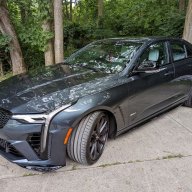
 
2026 CT5-V Blackwing w/Precision Package 6spd
I’ve barely had mine a month so I don’t have too much to complain about except the weather is going to keep me from driving it.

#1. Build Quality & Quality Control: My hood was clearly dropped prior to painting and the corner near the fender by the windshield was bent. It was also horribly aligned. The center console doesn’t look properly fit together.
#2. Am I blind or is there no way for a charging cord to be routed out of the center console? There are usb ports and a “cigarette lighter” port but I can’t for the life of me see where a cord would come out w/o being pinched by lid.
#2a. That my phone gets so hot from the inductive charging that it shuts down.
#3. The size of the console in the manual is a complete waste. What am I putting in there, a pack of gum? It’s also not easily accessible for this of us who sit more forward (Lollipop Guild).
#4. Not having the same center console control as the automatic. I would have rather have had the controls over that small area to out my key fob.
#5. Not a fan of the delay when opening the doors.
#6. No place to put your sunglasses.
#7. Not being able to set a default screen (e.g. the three gauges. Not having more options for the tripometer or being able to customize the different gauge screens in the main display.
#8. The 1500 mile full break-in. It’s killing me!
 
  1. The wireless phone charger.

    With my old iPhone 15 Pro Max, it would only charge if it was positioned perfectly. Hit a bump or take a turn and it would slide just enough to stop charging.

    I’ve since upgraded to an iPhone 17 Pro Max, but I put the BW away for the winter before I could test it. So who knows—maybe the problem’s already solved. I’ll find out in the spring.
I'd blame the phone, not the car. But then I'm an Android user so it's always the iPhone's fault. Seriously, I've had no problems the few times I've dropped my Pixel 8 on my 4BW charging pad.
 
Android snob. Just a wannabe. J/K. It’s definitely something w/the car b/c it happens in my CT4-V also but does not happen when I put it on inductive charge at home. I have Qi chargers around the house and no issue. It does happen with my Ridge charger pack too so maybe it is the type of “connection”? Thanks for the reply.
 
No biggie but I'd prefer I could control the car lighting up it's headlights the moment I step into the garage. If I want that in a mall or whatever that should be my decision, not Cadillacs.

I hate Nanny issues on cars.
 
To disable the dynamic headlight display (also known as the “walk-up lighting choreography” or approach lighting animation) on your 2026 Cadillac CT5-V Blackwing—which activates the LED headlamps, vertical lighting signatures, and related exterior animations as you approach the vehicle—follow these steps using the 33-inch diagonal advanced LED display infotainment system:


1. Tap the Settings icon (gear symbol) on the home screen of the touchscreen.


2. Select Vehicle > Comfort & Convenience (or Lighting if available as a direct submenu).


3. Scroll to Approach Lighting or Walk-Up Lighting (it may be labeled as “Exterior Welcome Lighting” or “Dynamic Approach Animation”).


4. Toggle the option to Off.


This prevents the sequenced lighting sequence from triggering when you walk up to the car with the key fob detected nearby. The feature is designed for a premium welcome experience but can be manually reactivated anytime via the same menu. Note that this won’t affect standard auto headlight functionality (e.g., on/off with ambient light sensors) or adaptive forward lighting while driving.


If the exact menu path varies slightly due to software updates, check your owner’s manual under “Lighting Features” or “Exterior Lighting” for confirmation. The 2026 model carries over this system from the 2025 refresh with no reported changes.
 
To disable the dynamic headlight display (also known as the “walk-up lighting choreography” or approach lighting animation) on your 2026 Cadillac CT5-V Blackwing—which activates the LED headlamps, vertical lighting signatures, and related exterior animations as you approach the vehicle—follow these steps using the 33-inch diagonal advanced LED display infotainment system:


1. Tap the Settings icon (gear symbol) on the home screen of the touchscreen.


2. Select Vehicle > Comfort & Convenience (or Lighting if available as a direct submenu).


3. Scroll to Approach Lighting or Walk-Up Lighting (it may be labeled as “Exterior Welcome Lighting” or “Dynamic Approach Animation”).


4. Toggle the option to Off.


This prevents the sequenced lighting sequence from triggering when you walk up to the car with the key fob detected nearby. The feature is designed for a premium welcome experience but can be manually reactivated anytime via the same menu. Note that this won’t affect standard auto headlight functionality (e.g., on/off with ambient light sensors) or adaptive forward lighting while driving.


If the exact menu path varies slightly due to software updates, check your owner’s manual under “Lighting Features” or “Exterior Lighting” for confirmation. The 2026 model carries over this system from the 2025 refresh with no reported changes.
Sounds like,e you should change your name to “Tony_owners_manual”
 
It blows my mind that people still ask basic questions about their own car that are answered in the owner's manual, or just by looking through the settings.

That's like asking for directions to your own house while standing in your driveway holding a map.
Don't be so silly...obviously they were looking towards the street from the driveway when they asked for directions
 
Seriously, its disappointing at the price point for the 4's and 5's the owners, once they take delivery of these "HALO'S", have to subsequently go out and spend more cash on dents, dings and paint correction. A matter that GM and Caddy has the responsibility to provide, in an acceptable condition to its customers. This problem seams' to repeat itself over and over from what I read in these threads.

What the Hell? Cadillac has ZERO, repeat ZERO responsibility for dents and dings after it leaves the dealer's lot. GM would go broke if they had to use your standards.
 
Just remembered another MAJOR thing I don’t like about the Blackwing. Besides shitty build quality for a HALO car that costs $140+K how is it that you could spend a. Minimum of $100K and they can’t even include a properly formatted SD card for the PDR. Really? Really Cadillac? This is where you save a few sheckles?
 

Double Your Chances!

Supporting Vendors

Apex Wheels

Exhibitions of Speed

Signature Wheels

V-Series Marketplace

Advertise with the Cadillac V-Net!

Torque Shop

Our Partners

Back
Top Bottom