Welcome to the Cadillac V-Series Forums!

PSA Regarding CT5 Blackwing SD Cards for PDR and Surround Vision Recorder

Update, maybe this helps others.

Although I had visually confirmed the connectors were plugged into the sd slot by peaking behind the trunk liner. Yesterday I removed the trunk liner and found the smaller connector was not fully clicked in. My SVR now works with the white Samsung card. 😁

 
Update:
The 2024 owner’s manual says the minimum recommended SD card specifications for the SVR are at least 64GB (and still V30 and formatted FAT32). I first tried a 256GB card and it did not work, but a 64GB card did.

PDR requirements remain the same: exFAT, class 10 or better. It is possible for the PDR to record (and playback in the car) without the card being exFAT, but exFAT is needed to be able to play the tracks on a computer.
 
I was recently struggling with a Sandisk V30 Class 10 in my SVR. Out of the box it did not work (but did work in PDR). I tried formatting it on various computers and it still didn't work. I decided to give the PDR format option a try and it worked the first time.
 
Having just played SD card roulette on my 2023 5BW, just wanted to add some additional information about what worked for me to this thread.

Bought several Samsung Endurance Pro SD cards (micro+adapter) from 64GB to 256GB to try and nail down the max size I could use for both the PDR and SVR. I popped the 256 into the PDR and it worked right out of the box in exFAT format, no additional formatting needed.

I then tried the in-car format via PDR and then popped that same 256 into the trunk SVR - no SD card detected. On a Windows 11 PC,I downloaded GUIformat and reformatted the 256 card into FAT32 using a 32kb allocation size. Still "No SD card detected" on the SVR. I played around with various allocation sizes and none got the 256 card working in the SVR.

I went to the next largest size, a 128GB card, reformatted it into FAT32 with a 32kb allocation size, and that was picked up by the SVR! Tested and confirmed that it records from all four cameras and I can play back in car.

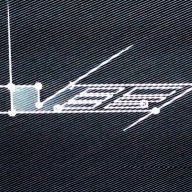
The only thing I've noticed with the SVR is that on the front camera specifically, I have this weird artifact at the bottom middle of the screen as pictured below, it's a static glitch that is always present. Has anyone else had this problem? The front camera functions normally in every other application (parking, PDR).
1000021479.jpg
 
PDR requires exFAT format. My 1TB card works fine.

View attachment 33370
Yep, I have a 256GB card in exFAT in the PDR and that works just fine. The screenshot above is from the front camera SVR view - the SVR is the only situation where I'm getting that glitchy artifact and only on the front camera.

But great to know a 1TB card works! I haven't seen on any forum where anyone's confirmed use of anything bigger than a 256GB card.
 
Last edited:
Yep, I have a 256GB card in exFAT in the PDR and that works just fine. The screenshot above is from the front camera SVR view - the SVR is the only situation where I'm getting that glitchy artifact and only on the front camera.

But great to know a 1TB card works! I haven't seen on any forum where anyone's confirmed use of anything bigger than a 256GB card.
I'm wondering if there is a difference in the card size compatibility for MY '22-24 and '25-26 - so caution may be advised.
 
I'm wondering if there is a difference in the card size compatibility for MY '22-24 and '25-26 - so caution may be advised.
That is certainly possible. The 2025-26 has PDR v2.5. Possible the 2022-24 v2.0 might have a different size restriction. I can only confirm 1TB works on 2025-26 PDR.
 
The only thing I've noticed with the SVR is that on the front camera specifically, I have this weird artifact at the bottom middle of the screen as pictured below, it's a static glitch that is always present. Has anyone else had this problem? The front camera functions normally in every other application (parking, PDR).
I have the same artifact on my '22 5BW since new. Seems that some cars have it and some don't. I never bothered to have the dealer check it out because it's minimal.

For those who are using larger SD cards, have any of you tried accessing the recordings / files from a Windows or Mac computer? I had tried 128 Gb cards (Samsung Pro Endurance) for both SVR and PDR with proper formatting of FAT32 and exFAT, respectively. They both recorded everything properly and played back just fine on the car display. However, I could not read any files on either my Win11 laptop or my son's Mac. That was concerning given if I ever had an accident where I needed to access the files outside of the car itself, I might not be able to do that.

I also had my son try formatting the cards with his Mac and that didn't work either. After that, I really didn't bother messing around with it and just went back to the 32 Gb cards. For anyone who has used a larger size card for both SVR and PDR and successfully accessed the files from a Win11 machine, what utility did you use for the format and what allocation size did you use?
 
I have the same artifact on my '22 5BW since new. Seems that some cars have it and some don't. I never bothered to have the dealer check it out because it's minimal.

For those who are using larger SD cards, have any of you tried accessing the recordings / files from a Windows or Mac computer? I had tried 128 Gb cards (Samsung Pro Endurance) for both SVR and PDR with proper formatting of FAT32 and exFAT, respectively. They both recorded everything properly and played back just fine on the car display. However, I could not read any files on either my Win11 laptop or my son's Mac. That was concerning given if I ever had an accident where I needed to access the files outside of the car itself, I might not be able to do that.

I also had my son try formatting the cards with his Mac and that didn't work either. After that, I really didn't bother messing around with it and just went back to the 32 Gb cards. For anyone who has used a larger size card for both SVR and PDR and successfully accessed the files from a Win11 machine, what utility did you use for the format and what allocation size did you use?
I had the exact same issue with my 22 5BW. I can see the video playback in the car, but when reading it with a Mac or PC a lot of the files are unreadable. This was with 128GB. So I’m just staying at 32GB.

Plus, now I have an aftermarket 4K front and 2K rear camera so I don’t care much about SVR except for parking which works fine. And SVR has no sound or impact sensing which is stupid. It doesn’t take the place of a good dash cam set up.
 
...

Plus, now I have an aftermarket 4K front and 2K rear camera so I don’t care much about SVR except for parking which works fine. And SVR has no sound or impact sensing which is stupid. It doesn’t take the place of a good dash cam set up.
Not sure about the impact sensing with the SVR, but I DO get security recordings when people get near my car when it is sitting unattended. I have not had an impact incident, but would guess it would catch that in some cases. I began to notice the recordings more when the car was at the dealer lot and they would come out daily to check to be sure all the cars were locked up for the night. I could see the people walking by and checking doors.
 
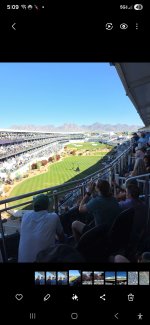
Don't have time now to go into it too much (I'm at the WM Open right now!)..but when I was following right behind my wife last Summer and saw her get hit from another car, I got it all on the svr and showed it to the police from the car and then downloaded it to my Windows and my phone from all 4 cameras to send to insurance (100% other guys fault). When I have time i'll share clips.

... But I've never noticed it get security footage (wish it did.... Got keyed 1x and got my bumper hit another time when I was parked). I have a 22 5BW
 
Don't have time now to go into it too much (I'm at the WM Open right now!)..but when I was following right behind my wife last Summer and saw her get hit from another car, I got it all on the svr and showed it to the police from the car and then downloaded it to my Windows and my phone from all 4 cameras to send to insurance (100% other guys fault). When I have time i'll share clips.
What make, size and format is your card?
 
I did notice when I formatted from the car pdr software. I could no longer read the card from a Mac, but still could from a win11 PC. I decided to reformat with the Mac which then all systems can use and see.
 
Just pulled both cards and checked on my Win11 machine. To refresh, 256GB Samsung Endurance Pro formatted in-car via PDR in the PDR slot, and a 128GB Endurance Pro in the SVR formatted using GUIFormat in FAT32 on the same Win11 system.

PDR files are .mp4 and played just fine in both Windows Media Player and VLC.

SVR files are .avi and more finnicky in terms of playback - files labeled as NRML as in normal driving play just fine in Media Player and VLC. However, files labeled SECY which auto-record when the car detects nearby motion bring up an error message when trying to play them in Media Player (it thinks it's a corrupted file) but are just fine in VLC.

Interestingly on the SVR .avi files, that same visual artifact I noted earlier when viewing the front camera in-car does not show up when played in Windows.
 

Double Your Chances!

Supporting Vendors

Apex Wheels

Exhibitions of Speed

Signature Wheels

V-Series Marketplace

Advertise with the Cadillac V-Net!

Torque Shop

Our Partners

Back
Top Bottom