Welcome to the Cadillac V-Series Forums!

SCREEN ICON MEANING

Daniel Goss

Member
Joined
Aug 28, 2025
Messages
24
Location
East Texas
V-Series Cadillac(s)?
2025 CT5V Blackwing
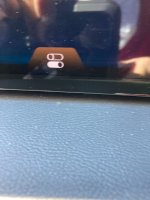
When I do a remote start of my car, then get in, before I hit the start button, this shows on the information screen. It appears to be two small slide switches. But when I try to slide them, nothing happens, and after I hit the start button, they go away. Educate me, what are they?
 

Attachments

  • IMG_5012.JPG
    IMG_5012.JPG
    1.3 MB · Views: 66
I have that icon on my center screen in my Yukon. I don't remember what it's for, and a quick look at the book, I can't even find it in the book. My only thought, does it change the dash from "day" to "night" mode? I'll have to play with it next time it's out.
 
From AI:

On your 2025 Cadillac CT5-V Blackwing, that icon is the Quick Controls / Settings Toggle button.
Because the 2025 model year introduced the massive 33-inch curved LED display, many secondary vehicle control switches were moved from physical buttons on the dash into digital shortcuts on the left edge of the screen, closest to the steering wheel.

Tapping this specific icon will slide open a Quick Settings drawer directly on your display. From this menu, you can instantly toggle common operational features without having to dig deep into the main vehicle settings pages. Depending on how you configure your display preferences, this panel typically handles:
  • Exterior Lighting Overrides (manually forcing headlights or parking lights on/off)
  • Traction Control & StabiliTrak quick toggles
  • Auto Engine Stop/Start enable/disable overrides
  • Gauges & HUD Layout setup shortcuts
 
Torque Shop

Supporting Vendors

Apex Wheels

Exhibitions of Speed

Signature Wheels

V-Series Marketplace

Advertise with the Cadillac V-Net!

Our Partners

Back
Top Bottom